146
6

NECESSARY TO THE SECURITY OF A FREE STATE, THE RIGHT OF THE PEOPLE TO KEEP AND BEAR ARMS, SHALL NOT BE INFRINGED
PRINT A F*CKING GUN ★
PRINT A F*CKING GUN ★
PRINT A F*CKING GUN ★
PRINT A F*CKING GUN ★
RELEASE // lbry // 2a53b9af3629048132bc8d2…
Released September 14, 2025, 1:22 AM
Indexed March 9, 2026, 12:52 AM
346.8KiB
“
”
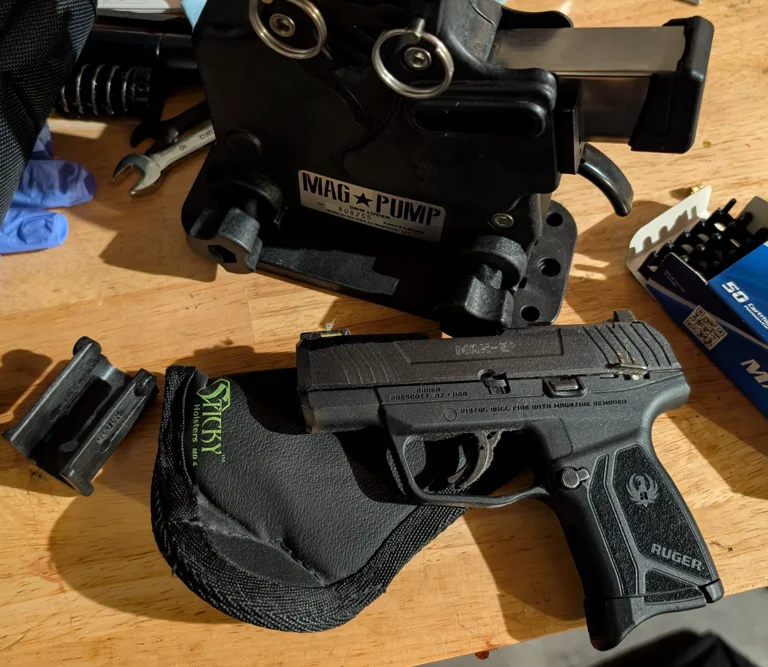
Ruger Max-9
for my own print I used polymaker PETG with the standard .3 settings with a .6mm nozzle.
no supports needed even with PETG.
the magazine sleeve lug recess was not supported and mine printed without issue, its a much larger bridge than the magazine release lugs.
- Inserts just like the other magpump magazine sleeves
- Put the magazine in at an angle and then drag it until the lugs engage with the magazine lug recesses
- Push the sleeve in until the magazine sleeve lug enganged with the sleeve release, it should be fairly solidly in the magpump at this point
- load as you have before, you will see the magazine move a bit but it shouldn't cause any issues.
guncadindex tags:
9x19mm
magpump
Ruger
max-9
magazine
LBRY Tags: 9x19; magpump; ruger; magazine; adapter